
Advanced Topic Skip if you’re new, explore when you’re ready.
The driver settings for a DYNAMIXEL U2D2 driver are much the same as a standard network or serial driver. However, there are a few settings to be aware of:
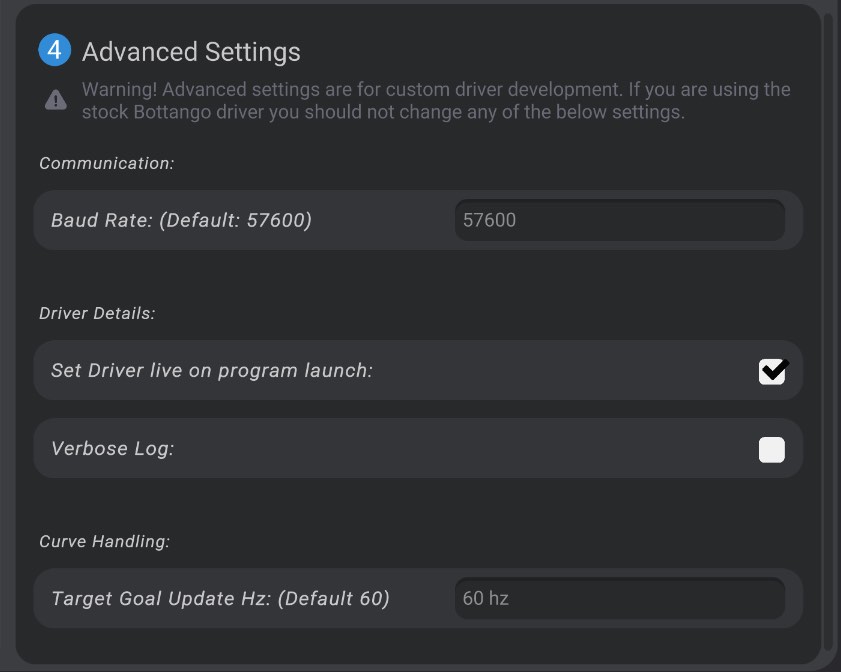
Double-check that the baud rate of the driver in Bottango matches the baud rate of your actuators! The baud rate of communication with DYNAMIXEL actuators defaults to 57600, as that is the default value for DYNAMIXEL actuator factory settings. However, I recommend 115,200 as a baud rate. If you make that change, be sure to do so in both the ROBOTIS DYNAMIXEL Wizard as well as in Bottango. If you choose a baud rate at 1M+, you’ll need to configure USB latency on your platform to support a 1M+ baud rate.
When enabled, in the hardware log Bottango will output the contents of every incoming and outgoing packet.
Unlike standard drivers which work by caching keyframe data on the driver ahead of time, Bottango sends target goal positions to the DYNAMIXEL actuators just in time, at a target update frequency. The default value is 60 Hz, or 60 times a second. Changing this value may require some trial and error for your use case to find the highest value that produces quality results without causing communication overruns and errors.
When you create and select a virtual DYNAMIXEL in Bottango, you can set the following settings:
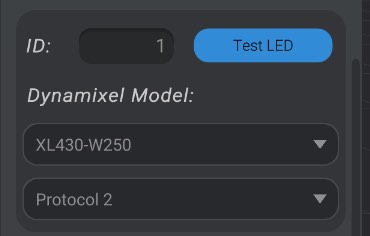
Enter the ID assigned to the DYNAMIXEL actuator (between 1 - 252)
After the DYNAMIXEL actuator is live and successfully connected, you can press this button to turn on the test LED.
Select the DYNAMIXEL actuator model from the list of available models. Most common models are in the list, and when selected Bottango will look up the control table for you. As well, at the bottom of the list is the option to provide your own custom control table. If you select custom protocol, you can enter the required control table values and data lengths for the commands Bottango requires to communicate with a DYNAMIXEL actuator.
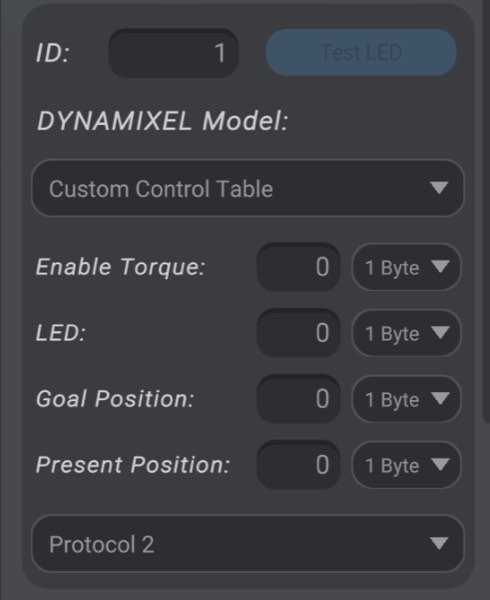
What protocol should be used to communicate with this DYNAMIXEL actuator. Attempting to set protocol 2 on a model that cannot support protocol 2 will give you a warning and prevent that action.