
Advanced Topic Skip if you’re new, explore when you’re ready.
You can apply certain “code-free” playback behavior when exporting animations. You are also able to write your own playback logic if you’d like in Bottango firmware. Be sure to refer to the Bottango firmware documentation for more details on how and where to add your own custom playback logic for exported animations.
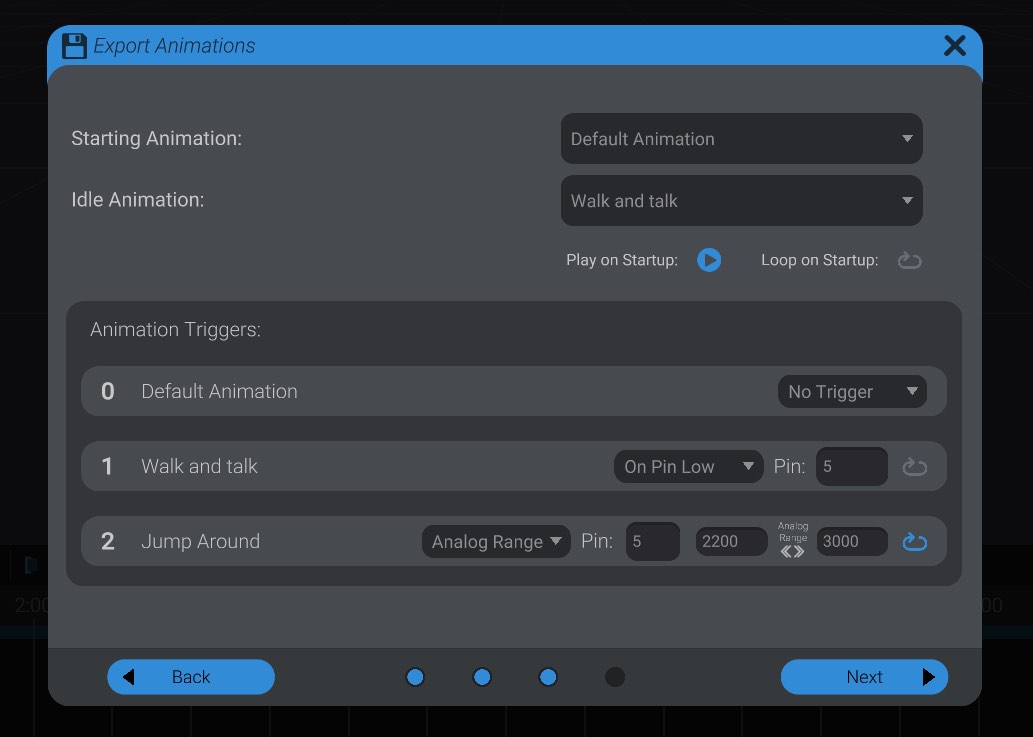
The starting animation determines the starting position of all effectors when the code first begins running. Even if you are not going to play back an animation immediately at start, this tells the code where each effector should begin from when the driver powers on.
The idle animation is an animation to play when nothing else is playing. If left at none, the final pose of the last played animation will be held.
“Play animation on start” controls whether the starting animation should play when the driver powers on, or just be used to determine the starting pose. “Loop on startup” controls if that animation loops when the driver powers on.
For each animation, you can also set up a trigger based on a pin state. You can select to trigger the animation based on a pin being taken high, taken low, or falling in an analog range. Be sure to refer to the valid analog range of your microcontroller.
For microcontrollers with specific analog pins, the driver will automatically use the analog pin of that number. As an example, an analog range option with pin 5 on an Arduino Uno R3 will use pin A5, not pin D5.
If you want to write your own playback logic, the settings you put here will still try and execute. If you want a “clean slate:”
Then execute your own playback logic in the Bottango firmware.