
Expert Topic for experienced builders.
Entirely unrelated to target poses is another tool in Bottango called Dynamic Constraints. With Dynamic Constraints, you can influence the behavior of one motor (the follower) based on the movement of another motor (the leader).
Currently, there is only one type: “Offset Range of Motion,” but more will be added soon.
An easy-to-understand use case of the “Offset Range of Motion” Dynamic Constraint is to think about a scissor lift powered by two motors, one on either side of the platform.
In this example, if just one motor moves, it would tilt the platform rather than move it up or down. If you want the platform to move up or down, you would need to move both motors in unison. If the motors move in unison while maintaining the offset between the two that creates a tilt, the tilted pose would move up or down.
With this dynamic constraint, you can create and hold a pose with a motor, and then offset it by a leader motor as the leader motor moves. With Dynamic Constraints, you can recreate that relationship.
Select the motor you want to use as the follower in the constraint. In the scissor lift example, the follower would be the motor that ultimately controls the tilt angle of the platform. In the Dynamic Constraint section, change the dropdown from “none” to “Offset Range of Motion.”
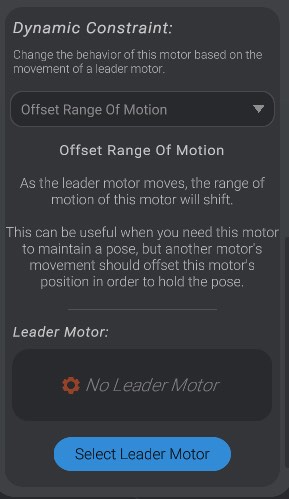
Then select a leader motor. In the scissor lift example, the leader motor is the motor that ultimately represents the up/down movement. When the leader moves, the follower needs to move in step in order to maintain its pose.
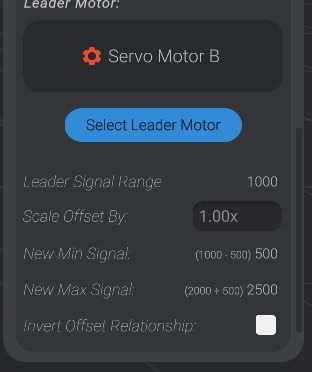
You can then configure the constraint. You will be shown the total range of signal from min to max value on the leader motor. As the leader moves, the follower motor will move in step. With a scale offset multiplier of 1.0, for every 1 signal that the leader motor moves, the follower will also shift its range of motion by 1 signal in the same direction (or the opposite direction if you select invert offset relationship).
This may seem like a difficult concept to grasp, but it is clearer when visualized. With a Dynamic Constraint setup, you will see some extra indicators in the UI of the motor.
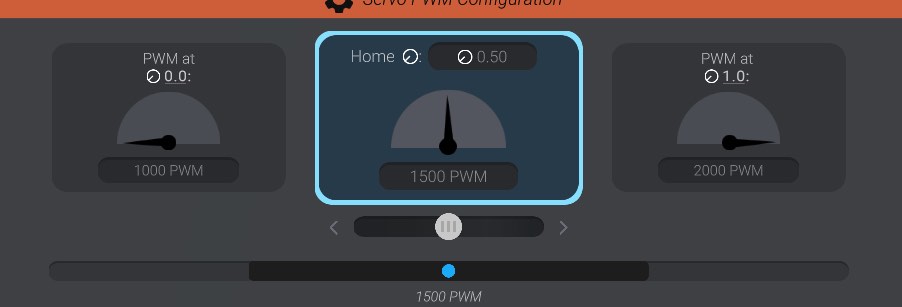
In this example, the selected follower motor is in the direct middle of its range of motion at 1500 PWM, and the leader motor is also in the direct middle of its range of motion. However, when we shift the leader to its maximum position, you will see that what is the middle of the follower shifts too:
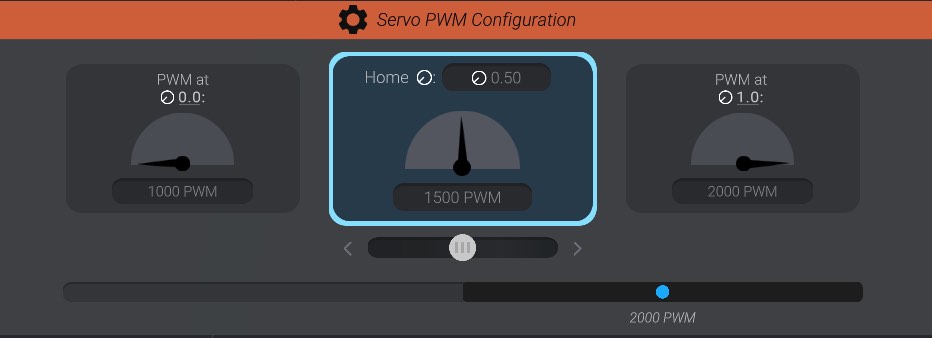
Now the follower motor is at 2000 PWM to be at the middle point in its range of motion, having shifted its entire range of motion 500 units in one direction. This is because in this example, the leader motion, now at its end point, moved 500 units.
More examples and more kinds of constraints are coming soon.