
Expert Topic for experienced builders.
Commands are ASCII human readable, and are terminated with a ‘\n’ newline character. Parameters are separated with a ‘,’ character.
Every command contains a hash code as the final parameter. This allows you to verify that the command string did not get errors introduced over the line. If you would like to use the hash code, see the method bool checkHash(char *cmdString) in the C++ file src/BottangoCore.cpp to see the hash check logic. Hash parameters start with an ‘h’ character. As an example, you might see the command “xUC,4,h368\n”
The Python network driver ignores the hash value. Error rates in network communication are far lower than over serial, as network communication contains much more redundancy and error checking inherently.
There is generally a “call and response” format to communication. After sending a command from the desktop app, Bottango will wait until it gets the “ready for next” signal (in the form of the serial statement “OK”) before sending the next command.
// Acknowledge after parsing a commandOK\n// System startup messageBOOT\nBoot will be sent by the device after it first starts up, immediately after opening communication. It also can be used to determine that a restart has occurred by the desktop app.
// Handshake from desktop// Param 0 - Challenge codehrq,144\nTo start communication between the desktop app and the firmware, a handshake request is sent. The only parameter is a unique challenge code, that needs to be returned as part of the handshake response.
// Handshake response from device// Param 0 - Current firmware version// Param 1 - Challenge code repeat backbtngoHSK,0.7.1a,144\nFor the stock Bottango firmware, the returned firmware version will be the most recent version of Bottango that had a change to the driver code. You can see the expected driver version in the desktop app when you select a hardware driver. Bottango will refuse to connect to a driver that does not report the correct driver version.
In order to facilitate custom and network driver development, you can override this behavior. The driver code will change frequently, the API of the communication less so. As such, the all caps key “CUSTOMX” will also be accepted as a driver version, where “X” (IE “CUSTOM9”) is the version of the communication API instead of the version of the driver code.
The current accepted firmware version is 0.7.1a or CUSTOM9
If there is a version mismatch, the app will enter a very limited set of allowed commands, such as getting modules and updating the firmware.
// Handshake from desktophMOD,144\nNot all uses of the firmware have the same capabilities, and not all hardware has the same feature set. The Bottango firmware reports to the desktop app what capabilities it has as part of the initialization commands. From there, the desktop app tailors its behavior and allowed features based on the reported modules. The Modules Request from the desktop app starts that sequence.
Modules response follows a specific call and response order. You will also see this same call and response order when requesting other data from the desktop app, such as the request MAC address command.
-> hMOD,144\n // initial request<- OK\n // Ack from device<- MOD,ModuleName,Param,Param\n // first module response-> OK\n // Ack from desktop, meaning OK to continue<- OK\n // Counter ack from device<- MOD,ModuleName,Param, etc. // next module, repeating until EoM...<- MOD,EOM\n // end of modules flag from device-> OK\n // Ack from desktop<- OK\n // Counter ack from deviceHere are the current allowed module responses. If a device doesn’t implement a certain module at all, it will skip that module response entirely.
All module responses follow the format of MOD,modulename,params\n. MOD is a static string signifying the command is a module response, modulename is the name of the reported module in this line, and the params are comma separated additional payload.
// Report UID// param 0 - the UID of the device (usually the MAC address)MOD,UID,1a2b3c4d5e6f\n// Report Named Board// param 0 - If this is first part Bottango hardware, report it's product name// param 1 - report the hardware versionMOD,BOARD,Solar,1.7\n// Report Command Source// param 0 - Current command source// 0 == live USB only// 1 == exported animations only// 2 == Toggelable between live and export, in live mode// 3 == Toggelable between live and export, in exported modeMOD,CMD_SRC,1\n// Report Command Configuration// param 0 - Maximum length of a command in characters// param 1 - Maximum number of curves to cache per effector// param 2 - Are sync curves allowed (int cast to bool)MOD,CMD_CFG,255,3,1\n// Report Relay Configuration// param 0 - relay state// 0 == Relay is supported but disabled// 1 == Relay Bridge// 2 == Relay Peer// param 1 - This device MAC// param 2 - Bridge MAC (only if this device is peer)MOD,RLY,0\n // example usb onlyMOD,RLY,1,1a2b3c4d5e6f\n // example bridgeMOD,RLY,2,1a2b3c4d5e6f,2a3b4c5d6e7f\n // example bridge// Report PCA9685 is supportedMOD,9685\n// Report I2S Audio is supportedMOD,I2S\n// Report Command Configuration// param 0 - Reports behavior of stop button// 0 == Stop Button Pauses playing animations// 1 == Stop Button Sets Master to Not Live// param 1 - Stop Button behavior can be toggled.MOD,STP_BTN,0,0\nWhen all modules are reported, the device reports end of message:
// Report I2S Audio is supportedMOD,EOM\n// Time Sync from desktop// Param 0 - Current time in MS on desktop apptSYN,35800\nThe desktop app is authoritative on time, and synchronizes all connected hardware drivers every 30 seconds.
// Stop from desktopSTOP\nStop will cause the device to deregister and attempt to stop all motors, shut down, etc. After stop, Bottango expects a boot and handshake before it will send commands to the driver again.
// Deregister All EffectorsxE\n// Deregister Specific Effector// param 0 - identifier of effector to deregisterxUE,3\n// Clear All Curves (stop all animation / jogs, but keep system alive)xC\n// Clear Curves On Specific Effector// param 0 - identifier of effector to clear curvesxUC,3\n// Register Pin Servo// param 0 - pin// param 1 - Minimum PWM signal// param 2 - Maximum PWM signal// param 3 - Maximum PWM signal change per second// param 4 - Starting PWM signalrSVPin,3,800,1900,600,1500\n// Register i2c Servo// param 0 - i2c address// param 1 - pin// param 2 - Minimum PWM signal// param 3 - Maximum PWM signal// param 4 - Maximum PWM signal change per second// param 5 - Starting PWM signalrSVPin,64,3,800,1900,600,1500\n// Register Step Dir Stepper// param 0 - Step pin// param 1 - Dir pin// param 2 - Clockwise is low on dir pin (int cast to bool)// param 3 - Maximum counter clockwise steps from home (will be negative)// param 4 - Maximum clockwise steps from home (will be positive)// param 5 - Maximum steps per second// param 6 - Starting steps from home (should nearly always be 0)rSTDir,3,4,1,-500,500,1000,0\n// Register 4 pin Stepper Stepper// param 0 - Pin 0// param 1 - Pin 1// param 2 - Pin 2// param 3 - Pin 3// param 3 - Maximum counter clockwise steps from home (will be negative)// param 4 - Maximum clockwise steps from home (will be positive)// param 5 - Maximum steps per second// param 6 - Starting steps from home (should nearly always be 0)rSTPin,3,4,5,6,-500,500,1000,0\n// Register Curved Custom Event// param 0 - Identifier// param 1 - Minimum movement per second// param 2 - Starting Movement// param 3 - pin to drive (255 == none)rECC,myEvent,0.25,0.5,5\n// Register On/Off Custom Event// param 0 - Identifier// param 1 - Start on (int cast to bool)// param 2 - pin to drive (255 == none)rECOnOff,myEvent,5\n// Register Trigger Custom Event// param 0 - Identifier// param 1 - pin to drive (255 == none)// param 2 - trigger pin is HIGH (1) or LOW (0)rECTrig,myEvent,5,0\n// Register Color Custom Event// param 0 - Identifier// param 1 - 0 - 255 integer for starting red channel// param 2 - 0 - 255 integer for starting green channel// param 3 - 0 - 255 integer for starting blue channelrECColor,255,128,255\n// Register Custom Motor// param 0 - Identifier// param 1 - Minimum signal// param 2 - Maximum signal// param 3 - Maximum signal change per second// param 4 - Starting signalrMTR,myMotor,-1000,1000,300,0\n// Register I2S Audio Event// param 0 - Identifier// param 1 - audio file hashrAud,mySong,hashhashhash\n// Update Effector Signal Bounds// param 0 - Identifier// param 1 - new min signal// param 2 - new max signal// param 3 - new max signal change per secondupE,6,1000,2025,500\n// Sync/Home Effector// param 0 - Identifier// param 1 - Sync Type / Amount// 'home' == Mark stepper homed// 'rst' == Clear sync and mark un-homed// 'aCW' == Start auto sync - Clockwise// 'aCC' == Start auto sync - Counter Clockwise// +/- integer == Sync that many steps (- is ccw, + is cw)sycM,12,-100\n// Auto Sync Complete Response// param 0 - IdentifiersycMDone,10\nWith the default configuration, Bottango attempts to cache curves on the microcontroller, rather than send them just in time, whenever possible. When a curve is 1 second or less away from being played, Bottango will send the curve to the microcontroller, unless at least 3 curves are currently cached and waiting, in which case it will send the most immediate three, and wait to send the next curve until Bottango predicts that a cached curve has been played and can be removed.
Bottango sends to the microcontroller animation curves, rather than sampled data. This takes the form of a starting and ending keyframe and duration.
Please see src/BezierCurve.cpp to see how the incoming curve is translated into animation and sampled over time.
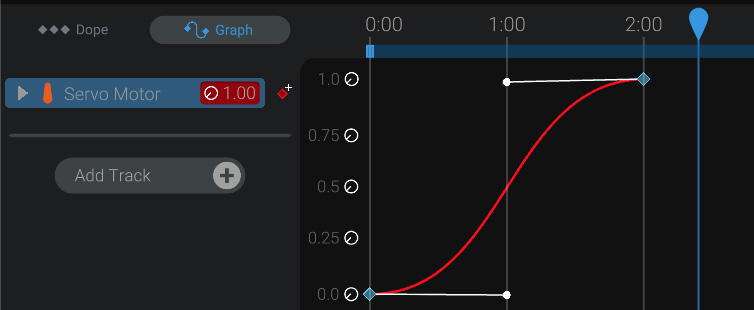
// Add Motor Curve// param 0 - Identifier// param 1 - Curve start time in MS, relative to last sync time from desktop (could be positive or negative)// param 2 - Duration of curve in MS// param 3 - Start movement (int between 0 - 8192)// param 4 - Start control point tangent X (relative to start time in MS)(always positive or 0)// param 5 - Start control point tangent Y (relative to start movement)(int between 0 - 8192)// param 6 - End movement(int between 0 - 8192)// param 7 - End control point tangent X (relative to end time in MS)(always negative or 0)// param 8 - End control point tangent X (relative to end movement)(int between 0 - 8192)upE,0,16012,2000,0,1000,-25,8192,-1000,-112\nThe example command string above is for this motor curve:
If the curve that Bottango would send has a duration at or very close to instant and should be executed now, an instant curve is sent instead. This optimizes the size of the serial stream, and allows for more responsive streaming of commands. Behind the scenes, the Bottango firmware code turns these instant curves into zero length regular curves with a start time at the time the command is received. This is purely a serial size space saving command.
// Add Instant Curve// param 0 - Identifier// param 1 - Target movement (int between 0 - 8192)sCI,3,550\nEvent Curves:
// Add On Off Curve// param 0 - Identifier// param 1 - Time of event (in MS relative to last sync time)// param 2 - On / Off value (int cast to bool)sCO,myEvent,322,1\n// Add Trigger Curve// param 0 - Identifier// param 1 - Time of event (in MS relative to last sync time)sCT,myEvent,322\n// Add Color Curve// param 0 - Identifier// param 1 - Time of event (in MS relative to last sync time)// param 2 - Duration of curve in MS// param 3 - Starting red channel (int between 0 - 255)// param 4 - Starting green channel (int between 0 - 255)// param 5 - Starting blue channel (int between 0 - 255)// param 6 - Ending red channel (int between 0 - 255)// param 7 - Ending green channel (int between 0 - 255)// param 8 - Ending blue channel (int between 0 - 255)sCC,myEvent,322,1000,255,0,0,0,0,255\n// Add Instant Color Curve// param 0 - Identifier// param 3 - Target red channel (int between 0 - 255)// param 4 - Target green channel (int between 0 - 255)// param 5 - Target blue channel (int between 0 - 255)sCCI,myEvent,255,0,0\n// Register Relay Controller// param 0 - Peer UID/MACrCtrl,1a2b3c4d5e6f\n// Relay ID Response// param 0 - Relay ID for registered peerrlyId,0\n// De-register Relay Controller// param 0 - Relay IDxUCtrl,0\n// De-register All Relay ControllersxCtrl,0\n// Pass through to peer// param 0 - Relay ID// Rest of tokens - Command to pass to relay peersR,0,xC\n// Pass Up from peer// param 0 - Relay ID// Rest of tokens - Command to pass up from relay peeruR,0,OK\n// Request Mac AddressrMAC\n// Mac Address Response// param 0 - Mac AddresssMAC,1a2b3c4d5e6f\nSync commands combine multiple commands into a single serial call and response.
Sync commands start with sSY, then a command prefix. Ex: “sSY,sC”
Following the command prefix, the rest of the params are passed. When the command ends, it is delinated with a ; instead of a \n newline. The command prefix is not repeated for each repeated command in the sync command. Ex: “sSY,sC,id,x,y,z;id,x,y,z;id,x,y,z”
If there is an additional different command, it is prefixed with a * to flag that a new command prefix should be tracked. Ex: “sSY,sC,id,x,y,z;id,x,y,z;id,x,y,z*xC,id;id”
// Sync Command ExamplesSY,sC,id,x,y,z;id,x,y,z;id,x,y,z*xC,id;id\n// OTA Update// param 0 - OTA Message Type// 's' == Start OTA// 'd' == OTA Data Packet// 'e' == End OTA// param 1 - OTA Payload// Start has no payload// Data is a 64 byte (or less) chunk// End is expected checksup of all dataOTA,d,xxxxxxxxxxx\n// Set Configuration// param 0 - Configuration Switch type// 'CMD' == Set desired command source// 'STP_BTN' == Set desired stop button behavior// 'RLY' == Set relay type// param 1 - Configuration Payload// CMD (2 == Live USB / 3 == Exported Animations)// STP_BTN (int cast to bool, true == shutdown, false == pause animation)// RLY (0 == USB, 1 == BRIDGE, 2 == PEER)// param 2 - Configuration Payload// RLY (If set peer, bridge MAC address)sCfg,CMD,3\n// Request Stop (IE Turn off Master Live)reqStop\n// Request PausereqPause\n// Request Play// param 0 - Index of animation to play (-1 is current selection)// param 1 - Start time in MS (-1 is current app time)reqPlay,2,100\nAs an example, reqPlay,2,100 would start playing animation 2 at 100 ms into the beginning of the animation. reqPlay,-1,-1, is the same as hitting spacebar while paused to start playing at the current point.